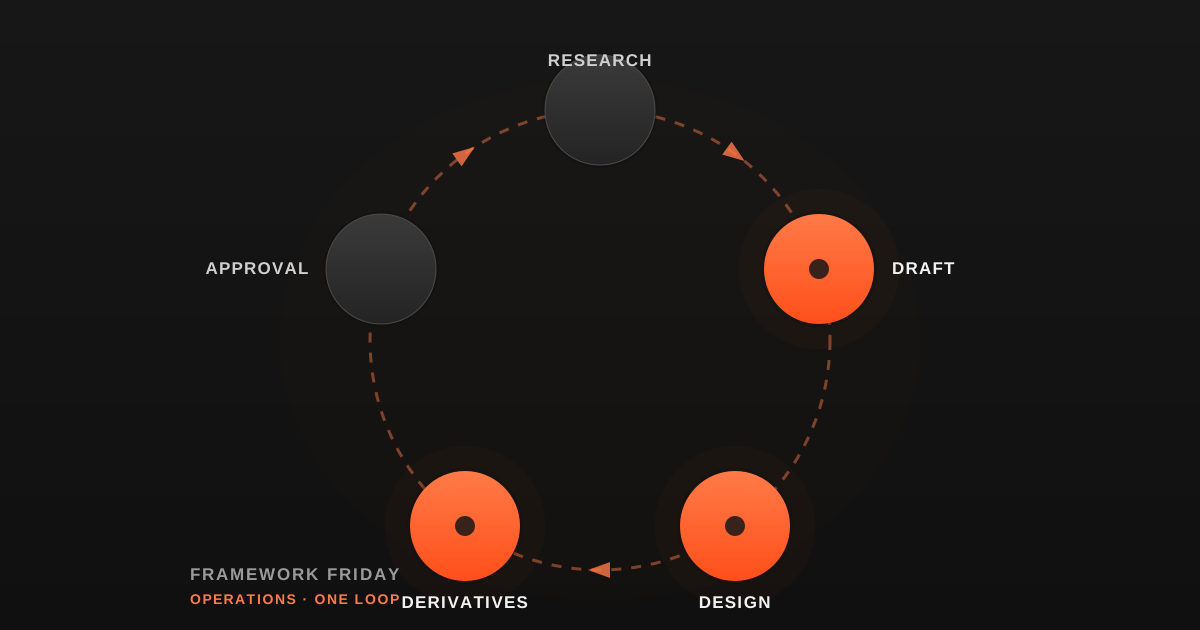
A chat window that writes good code is not an AI coding practice. It's one piece of a practice that's usually missing three others: something that runs the same procedure the same way every time, something that runs itself on a schedule without a person driving it, and something that keeps working after you close your laptop. We had the first piece for a long time and none of the other three — and that gap is the actual subject of this article, not a guess about what other teams have.
We build AI systems for a living, and our own practice now runs on all four — not because we planned it that way from day one, but because each piece got added exactly when the previous one broke under its own weight. Here's what each one actually is, what it's for, and what happens when you skip straight to the next one before the last one is solid.
A Skill Is a Written Procedure, Not a Prompt You Remember
A skill is the smallest unit: a written, reusable procedure that tells an AI exactly how to do one specific piece of work, saved somewhere anyone — or anything — can find and run again. Not a clever prompt retyped from memory each time. A file. We're running 335 of them today. That number by itself doesn't mean much. What matters is what happens when writing them outpaces making them findable: of 39 skills built here between July and August, only 1 was formally registered anywhere a person could discover it. Thirty-eight good procedures existed and were, for practical purposes, invisible. Writing the skill is the easy half. Registering it — putting it somewhere the next person, or the next AI, actually looks — is the half that went missing first, here.
An Automation Runs Whether Anyone's Watching or Not — That's the Whole Point, and the Whole Risk
A skill still needs someone to invoke it. An automation doesn't: it runs on a clock, with no session and no person driving it, whether that's useful this week or not. That's the entire value of an automation, and exactly what makes a broken one so hard to notice. One of our own scheduled jobs ran as a silent no-op for 136 days, logging 108 identical skip lines, before anyone caught it. A separate one kept burning compute daily for roughly 116 days after two separate reviews had already recommended turning it off. Nobody was lying about either job. Nobody was watching either job — and in our case, that turned out to be exactly how easy it is for an unmonitored automation to go unnoticed, not proof that every automation everywhere ends up that way.
A Loop and an Automation Are Not the Same Thing, Even Though They Feel Identical From Outside
It's easy to call anything that repeats "automated" and stop distinguishing further. We don't, because the two failure modes point in opposite directions. A loop lives inside one session: it re-runs at its own pace, caps how many can run at once, and expires itself after a few days by design — ours are capped at 50 concurrent and auto-expire at 3 days. An automation has no such leash. It's scheduled on a clock outside any session, which is exactly why the 136-day and 116-day incidents above were even possible in the first place. A loop can't quietly run for four months, because the loop stops itself. An automation can, precisely because nothing built into it does.
A Cloud Agent Keeps Working After You Close the Laptop — Which Means It Can Also Keep Not Finishing After You Close the Laptop
The fourth piece runs on infrastructure that isn't your machine, which is the actual point of it: it keeps going after you log off, on a minimum one-hour cadence, with no access to local files, pulling a fresh copy of the repo every time it runs. It's also intentionally boxed in. One of our own governing decisions states it plainly: cloud agents bypass the local permission system entirely, so the guardrails around them have to live in the instructions themselves, not in platform enforcement.
We hit the failure mode that design implies within months of relying on it. Background sessions could open a pull request but had no way to land it themselves — by the time anyone counted, that gap had left nine open pull requests, nine stranded git worktrees, and more than thirty stale branches sitting unmerged. The agents hadn't failed. They'd done exactly what they were told: produce the work, open the request, stop. Nobody had built the step after "stop" — so we built it: an explicit path that takes a background agent's finished branch the rest of the way in, without a person doing it by hand. Cloud agents don't hand you that step by default. You have to build it in on purpose, or watch the same pileup happen again.
Where You Don't Need All Four
This doesn't mean every AI coding practice needs all four layers immediately. If you're one person, shipping occasionally, and every task is different enough that writing a reusable procedure would take longer than just doing the work — a skill isn't worth writing yet, let alone scheduling one. Automations and cloud agents solve for scale and unattended operation; if nothing you do needs to run without you present, you don't have that problem yet, and building for it early just adds machinery nobody uses. We didn't build the four layers here because we'd proven the payoff in advance — we don't have a clean before-and-after number showing that. We built each one because going back to doing the previous layer's job by hand had already gotten worse than the incidents above. Check whether that's actually true for you before you build any of it. "It broke and I'd rather not go back to doing it by hand" is a real reason. "Everyone eventually needs all four" isn't one we can back up.
Build Yours: Which Layer Are You Missing?
Look at how you actually use AI to code today, and ask four questions in order. Is there a procedure you've retyped from memory more than once — a missing skill? Does anything you do need to happen on a schedule with nobody there to kick it off — a missing automation? Does anything need to keep running past the length of one sitting, safely, without you babysitting it — a missing loop? And when something finishes unattended, does anything actually land it, or does it just sit there, open, waiting — a missing finish line for your cloud agents?
If you can answer yes to at least two of those, the fix isn't building all four at once. It's building the next one you actually hit the wall on — the way we did, one wall at a time, dated and counted, not planned in advance.